Cave Casualties Emotes: Prices and Wheel Setup
Choose an emote by price and playback type, then equip it into one of your four wheel slots.
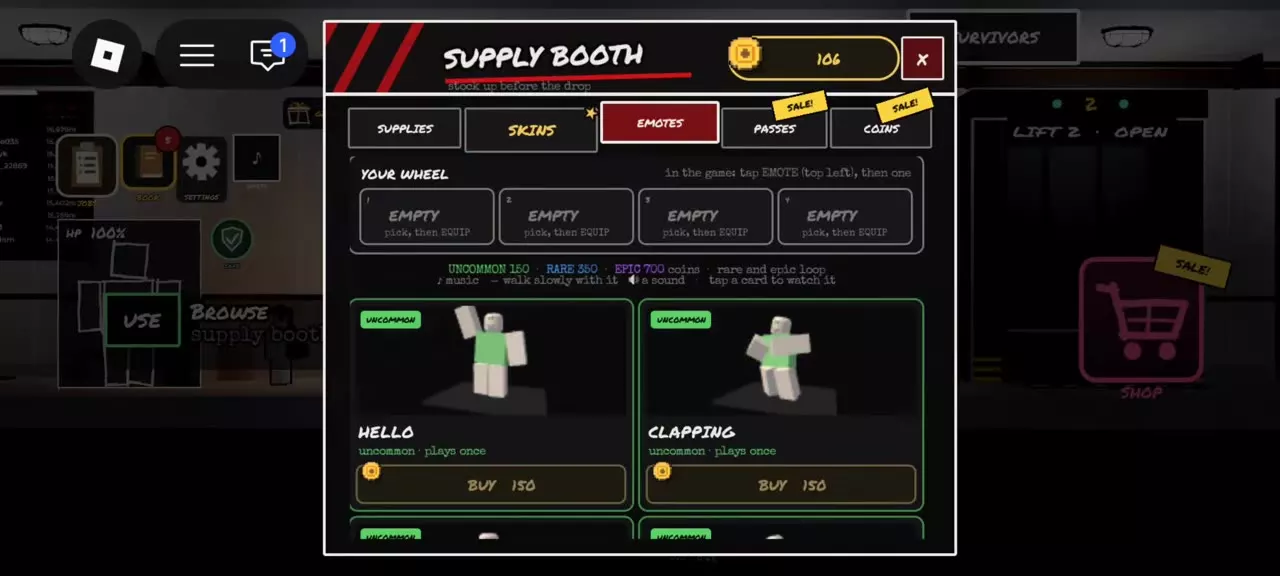
Buy emotes through Supply Booth → Emotes. Uncommon emotes cost 150 Coins and play once; Rare emotes cost 350 Coins and loop; Epic emotes cost 700 Coins and loop. To equip an owned emote, select a slot in Your Wheel first, then equip the action into it.
Emote Prices and Playback
- Uncommon: 150 Coins; plays once.
- Rare: 350 Coins; loops.
- Epic: 700 Coins; loops.
Choose Uncommon for a brief gesture at the lowest price. For a looping dance, Take the L and Default Dance each cost 350 Coins—350 Coins less than the Epic price.
Emote Directory
Compare the eight named emotes by rarity, price, and playback. All are sold in the Supply Booth’s Emotes category.
Compare named emote prices and playback types.
8 objects
|
|
Uncommon | 150 coins | Once |
|---|---|---|---|
|
An Uncommon emote that plays once. |
|||
|
|
Uncommon | 150 coins | Once |
|
An Uncommon emote that plays once. |
|||
|
|
Uncommon | 150 coins | Once |
|
An Uncommon emote that plays once. |
|||
|
|
Uncommon | 150 coins | Once |
|
An Uncommon emote that plays once. |
|||
|
|
Uncommon | 150 coins | Once |
|
An Uncommon emote that plays once. |
|||
|
|
Uncommon | 150 coins | Once |
|
An Uncommon emote that plays once. |
|||
|
|
Rare | 350 coins | Looping |
|
A Rare emote that loops. |
|||
|
|
Rare | 350 coins | Looping |
|
A Rare emote that loops. |
|||
Buy and Equip an Emote
- Approach the Supply Booth in the Staging Hall and use BROWSE to open the shop.
- Select Emotes. Tap an emote card to preview its animation.
- Choose an action and use its BUY option with enough Coins for the listed price.
- Select one of the four slots under Your Wheel.
- Equip an owned emote into the selected slot. Repeat the slot-selection and equip steps to configure the other slots.
Select the destination slot before equipping; the equipped action occupies that slot on your wheel.
Profile Appearance and Audio Settings
Open SETTINGS → AUDIO and use the EMOTE MUSIC toggle to turn emote music on or off. See controls and settings for the other menu options.
For more customization, browse badges, banners, and titles or compare backpack skins and skin crates.
Articles and guides
3Cave Casualties Backpack Skins and Skin Crates
Find Cave Casualties backpack skins, check your equipped appearance, and compare prices and collection sizes for Sillycore, Color Crate and more.
Cave Casualties Title Levels
Find every Cave Casualties title level from Newcomer to Lampless, and learn how to equip a title or select the newest automatically.
Cave Casualties Emotes: Prices and Wheel Setup
Compare Cave Casualties emote prices and playback types, buy actions at the Supply Booth, and equip owned emotes into your four-slot wheel.