
Cave Casualties Badges, Banners and Titles
Collect milestone badges, unlock backgrounds by discovering underground locations, and choose the title displayed in your SURVIVORS row.
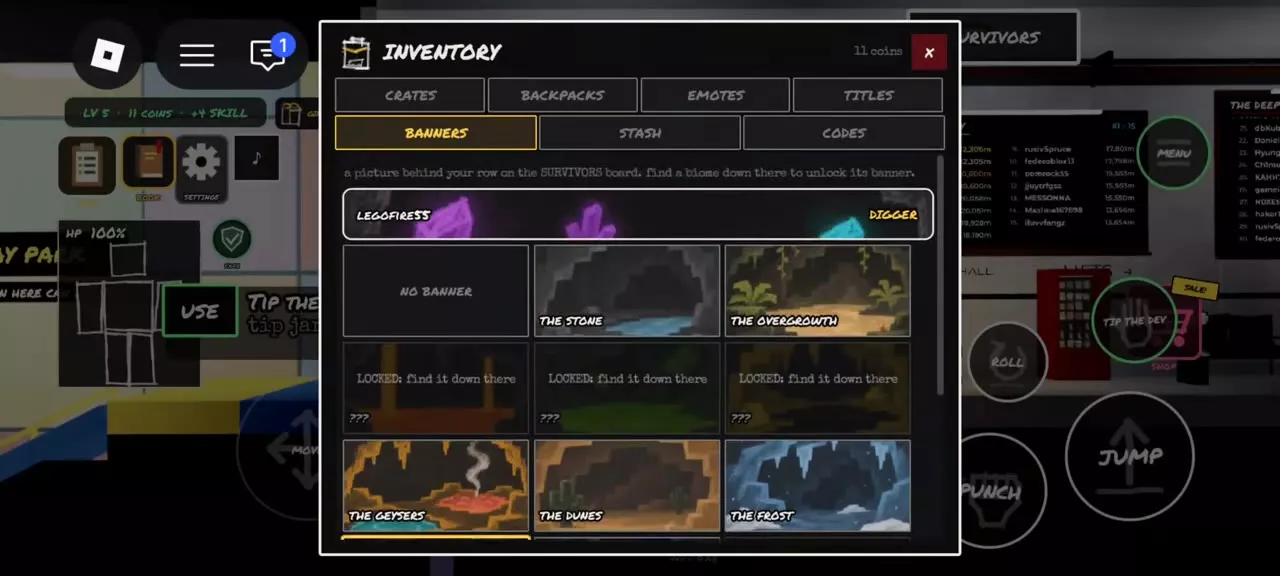
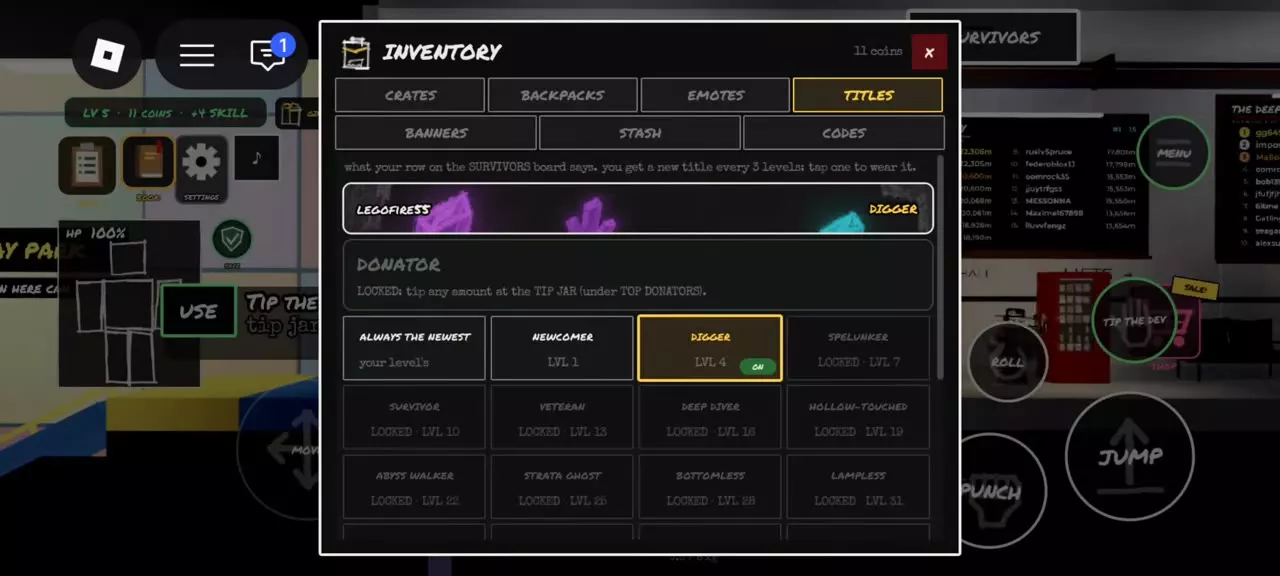
Earn CASUALTY by dying and LIMBO? by reaching the LIMBO biome. Discover underground locations to unlock their banners, then equip one in Inventory → Banners. Select a title in Inventory → Titles, or enable ALWAYS THE NEWEST. Donate any amount at the TIP JAR below TOP DONATORS in the Staging Hall to unlock Donator.
Milestones and Profile Appearance
Badges mark achievements, while banners and titles customize your personal row on the SURVIVORS board.
- Badges: collect milestones such as dying or reaching LIMBO.
- Banners: discover a location underground to unlock its background.
- Titles: unlock names through level progression or the Donator donation requirement.
Choose a banner to change your row’s background and a title to change the name displayed alongside your profile.
Badge, Banner and Title Directory
Compare four badges, seven location banners, and the Digger and Donator titles below. Expand an entry for its description and related location.
Find badge milestones, biome banners and profile title unlocks.
13 objects
|
|
— | — | — |
|---|---|---|---|
|
An official Cave Casualties badge associated with becoming an experiment.
|
|||
|
|
Die | — | — |
|
A badge awarded for dying.
|
|||
|
|
Reach the LIMBO biome | — | — |
|
A badge awarded for reaching the LIMBO biome.
|
|||
|
|
— | — | — |
|
A badge associated with the Feral transformation.
|
|||
|
|
Discover The Stone | — | — |
|
A SURVIVORS row background unlocked by discovering The Stone.
|
|||
|
|
Discover The Overgrowth | — | — |
|
A SURVIVORS row background unlocked by discovering The Overgrowth.
|
|||
|
|
Discover The Geysers | — | — |
|
A SURVIVORS row background unlocked by discovering The Geysers.
|
|||
|
|
Discover The Dunes | — | — |
|
A SURVIVORS row background unlocked by discovering The Dunes.
|
|||
|
|
Discover The Frost | — | — |
|
A SURVIVORS row background unlocked by discovering The Frost.
|
|||
|
|
Discover The Crystal Seams | — | — |
|
A SURVIVORS row background unlocked by discovering The Crystal Seams.
|
|||
|
|
Discover The Flooded Caves | — | — |
|
A SURVIVORS row background unlocked by discovering The Flooded Caves.
|
|||
|
|
— | 4 levels | Level progression |
|
A title unlocked at Level 4 and displayed in your SURVIVORS row.
|
|||
|
|
— | — | Donate any amount |
|
A title unlocked by donating any amount through the Staging Hall's TIP JAR.
TipsUse the TIP JAR below TOP DONATORS in the Staging Hall, then select Donator in Inventory → Titles. |
|||
Badge Milestones
CASUALTY unlocks when you die, including death from bleeding out. LIMBO? unlocks when you reach the LIMBO biome.
WELCOME carries the description “You have become an experiment.” BECAME FERAL describes becoming something entities fear. For the transformation’s controls and consequences, see Passing Out, Revival and Feral.
Equip a Banner or Title
Set your banner
Discover the corresponding underground location to unlock its banner. Locked entries labeled ??? require finding their locations underground.
- Open Inventory → Banners.
- Scroll through the options and select an unlocked banner.
- Check the personal-row preview to see your background.
Select NO BANNER to clear the background.
Choose your title
Level titles begin with Newcomer at Level 1, with a new title every three levels. Digger unlocks at Level 4.
- Open Inventory → Titles.
- Select an unlocked title.
- Check its ON indicator and the title in your personal-row preview.
Enable ALWAYS THE NEWEST to use the latest title available at your current level. Select a specific unlocked title when you want to keep wearing that name.
Unlock Donator
- Find the TIP JAR below TOP DONATORS in the Staging Hall.
- Donate any amount to unlock Donator.
- Open Inventory → Titles and select Donator to wear it.
Skins, Emotes and Title Levels
- Backpack skins and skin crates: compare appearances, crate prices and collections.
- Emote prices and wheel setup: choose an emote and equip it in a wheel slot.
- Title levels: look up the full level requirements from Newcomer through Lampless.
- Biomes, depths and layers: compare underground locations and their exploration conditions when choosing a banner to pursue.
Articles and guides
3Cave Casualties Backpack Skins and Skin Crates
Find Cave Casualties backpack skins, check your equipped appearance, and compare prices and collection sizes for Sillycore, Color Crate and more.
Cave Casualties Title Levels
Find every Cave Casualties title level from Newcomer to Lampless, and learn how to equip a title or select the newest automatically.
Cave Casualties Emotes: Prices and Wheel Setup
Compare Cave Casualties emote prices and playback types, buy actions at the Supply Booth, and equip owned emotes into your four-slot wheel.