Cave Casualties Map Symbols and Navigation
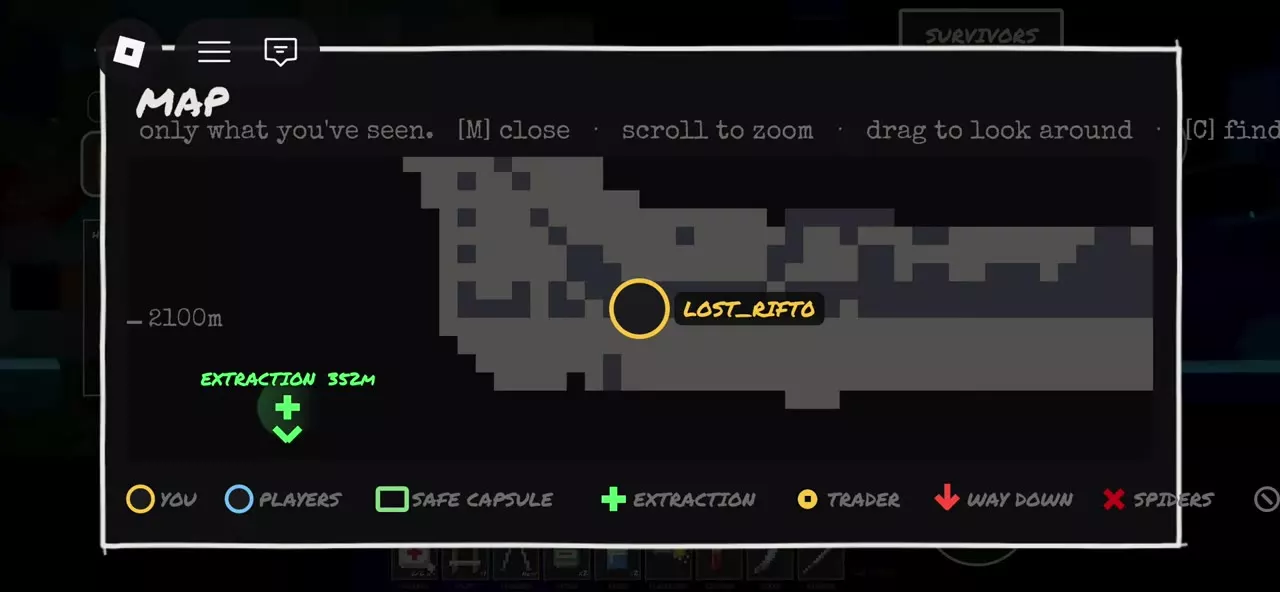
The Cave Casualties map helps you navigate passages you have already seen and identify players, facilities, hazards and routes downward.
Open Menu and select Map, then find your yellow position marker. Follow explored passages toward Way Down, a Trader or Extraction, and reopen the map as you move to check your position.
Explored Terrain and Map Controls
Open Menu → Map to see terrain you have already visited. Unseen areas remain outside the displayed map, so explore further to reveal more passages.
| Action | Control |
|---|---|
| Open map | Menu → Map |
| Zoom | Scroll wheel |
| Look around | Drag |
| Find your position | Find-yourself control |
| Close map | M |
Use the find-yourself control after dragging away from your position, then zoom in to inspect nearby passages.
Map Legend
| Legend label | Symbol | Meaning |
|---|---|---|
| You | Yellow circle | Your position |
| Players | Blue circle | Other players |
| Safe Capsule | Green square | Safe capsule |
| Extraction | Green cross | Extraction point |
| Trader | Yellow dot | Trader |
| Way Down | Red down arrow | Route farther down |
| Spiders | Red cross | Spiders |
| Body | Body label | A body |
| Waymark | Waymark label | Location marker |
The green Safe Capsule square and green Extraction cross mark different destinations. Choose Extraction when you want to leave the caves.
Capsule Directory
The Survey Capsule is your underground starting room. The Rescue Capsule is the destination for leaving alive with your carried loot.
Distinguish the starting Survey Capsule from a Rescue Capsule.
2 objects
|
|
Underground starting room | Open / Close capsule door |
|---|---|---|
|
An underground starting room with an operable capsule door. The starting message directs you to continue downward into the caves.
TipsCheck the map, approach the door and use E or USE to open it before descending. |
||
|
|
Safe extraction | USE / EXTRACT SAFELY |
|
A capsule that lets you leave the caves alive with your carried loot. Its safe extraction interaction lists XP and Coins as rewards.
TipsLook for the green light and EXTRACT sign, then use EXTRACT SAFELY. Follow the extraction guide for the route and reward conditions. |
||
Leave the Survey Capsule
The underground Survey Capsule starts damaged, with the lift gone and cold conditions outside. The starting message directs you downward.
- Open the map and check your position and the visible area around the capsule.
- Approach the door and press E at the interaction prompt, or use USE on touch controls.
- Leave the capsule and follow the cave passages downward. The open door also offers a close interaction.
One starting route leads into The Dunes, where sand, cacti and platforms at different heights shape the first stretch of cave.
Choose a Downward or Extraction Route
- Find your yellow You marker and inspect the explored passages around it.
- Choose a destination: follow Way Down to descend, look for Trader when you need a shop, or locate Extraction when you are ready to leave.
- For extraction, use the direction and distance indicator to orient yourself, then follow the available cave passages toward it. The indicator gives a direction; the terrain determines the route you can travel.
- Close the map, move through the cave and reopen it to check your position as you reveal more terrain.
At the extraction destination, look for a capsule with a green light and an EXTRACT sign.
Safe Extraction and Water Crossings
At a Rescue Capsule, use EXTRACT SAFELY to begin the lever interaction. See how to extract safely for the full exit task.
If your route takes you through flooded terrain, use the Flooded Caves crossing guide to plan movement between breathing spaces.